Tutorial 8 of 11
Reality Check — rent or buy, how rich am I, is it peanuts, early retirement
Beginner 8 min
Use the four Reality Check calculators in the Decisions desk — rent vs buy, income and wealth percentile, relative scale and the early-retirement bridge — with your household's numbers.
The Reality check card at the top of the Decisions desk answers four big money questions with the maths shown. Unlike the other calculators, their results appear at once and update while you type. They use the same engine as the public tools Rent vs Buy Calculator, Income & Wealth Percentile, Is It Peanuts? Relative Scale and Early Retirement Bridge.
1. Start a question from your household
Open Decisions in the desk list and press one of the four buttons: Rent or buy?, How rich am I?, Is it peanuts? or Early-retirement bridge. Ledgerly saves a new decision and fills in what it already knows:
- your household currency,
- your country (for the percentile and the pension age),
- your monthly income from the Budget desk, turned into a yearly figure,
- a budget line called Rent or Miete as the rent to compare with,
- your planned monthly costs as retirement spending.
Try it with the example City couple, renting: Rent or buy? starts with its rent of 1,240 EUR a month.
2. Rent or buy?
Enter the Purchase price of the home, the Down payment (% of the price), the Mortgage interest rate (% per year) and the costs you know. Every change recalculates the result:
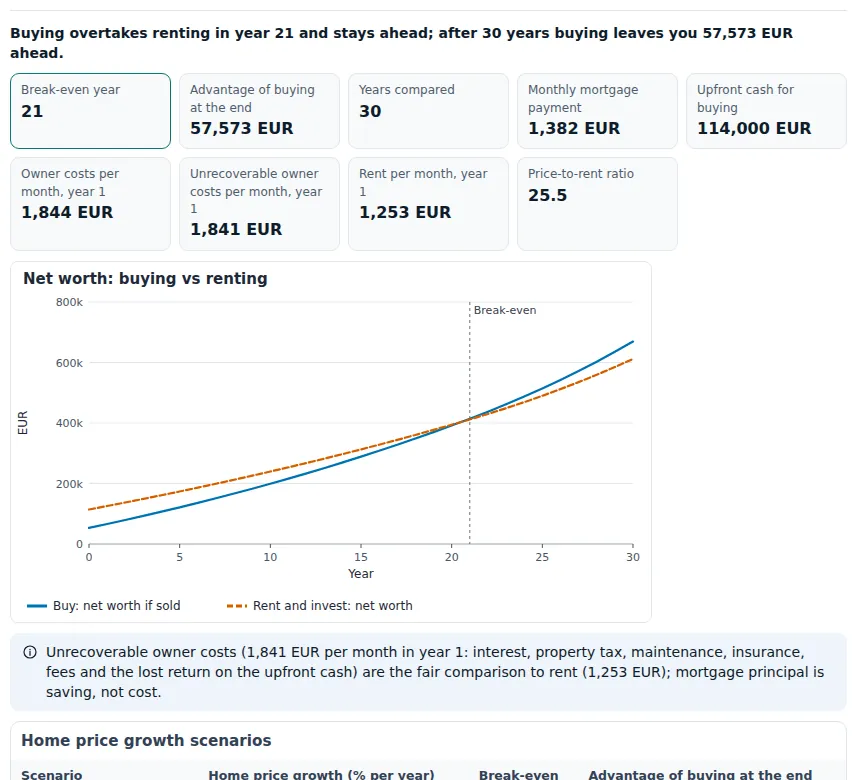
- Break-even year — the first year in which buying leaves you with more money than renting and investing the difference.
- Unrecoverable owner costs per month, year 1 — interest, property tax, maintenance, insurance, fees and the lost return on your upfront cash. Compare this with Rent per month, year 1.
- The chart Net worth: buying vs renting, the Home price growth scenarios and the Sensitivity table, which shows the break-even year for other price growth and investment returns.
Change Years to compare to the time you expect to stay. Short stays rarely favour buying because buying and selling costs need years to be recovered.
3. How rich am I?
Choose Household net income per year or Household net wealth under Compare, pick the Country and enter Your amount. For income, set People aged 14 or over in the household and Children under 14 in the household: Ledgerly divides by the same equivalence scale Eurostat uses.
The result gives Your percentile, the Median, the percentile in the whole EU or euro area and a table of published cut points — for income also scaled to your household size. Every result names its source (Eurostat EU-SILC or the ECB wealth survey) and its data year.
4. Is it peanuts?
Enter The big amount (gift, fine, price …) and the Net worth of the giver or payer, then your own Your net worth and Your net income per year. Ledgerly shows the share of their fortune, what the same share of your money would be and how long you would work for it. Your own gift for the reverse check scales a small gift of yours up to their fortune.
5. Early-retirement bridge
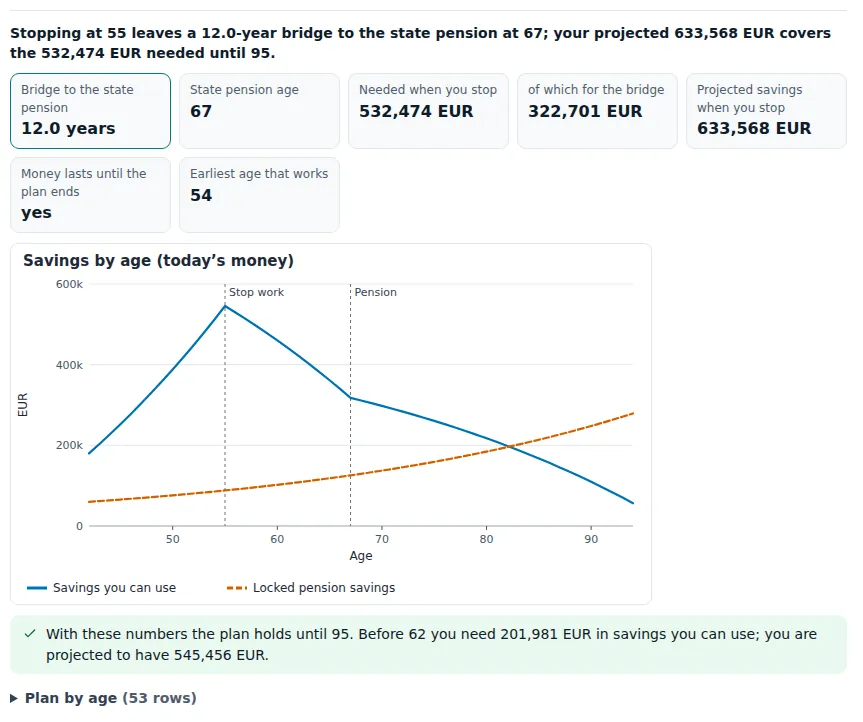
Pick the Country of your state pension, your Year of birth and the Age when you stop working. Ledgerly looks up the official pension age; leave State pension age (empty = from the country rules) empty to use it, or type your own. Add Locked pension savings today (401(k), Riester …) if part of your money cannot be used before a certain age.
The Plan by age table and the chart show every year until Plan until age. If the money runs out, the result says when and which earlier stopping age would still work.
6. Compare and report
Press Duplicate as variant B to compare two scenarios — for example stopping work at 50 instead of 55 — and see both side by side under A/B comparison. Every calculated decision also appears in the household report on the Report desk.
The calculators are models: they use constant growth rates and the tax inputs you give them. Check important decisions with your bank, pension provider or an adviser.
Ready to try it?