Tutorial 4 of 7
Mortgage plan B and big decisions
Intermediate 8 min
Compare a mortgage with and without extra repayments, plan appliance replacements and use the decision toolbox with variant A and B side by side.
This tutorial uses the Family home with a mortgage example: a €300,000 mortgage at 3.8 % with a 10-year fixed rate, a heat pump, an old roof and water heater, and two saved decisions.
1. The mortgage and its plan B
Open Loans. The first block holds the loan as agreed: Amount borrowed, Interest rate (% per year), Loan type, Term (years) or the German-style Initial repayment (% per year, optional), Start date, Fixed rate for (years, optional) and Fees at payout.
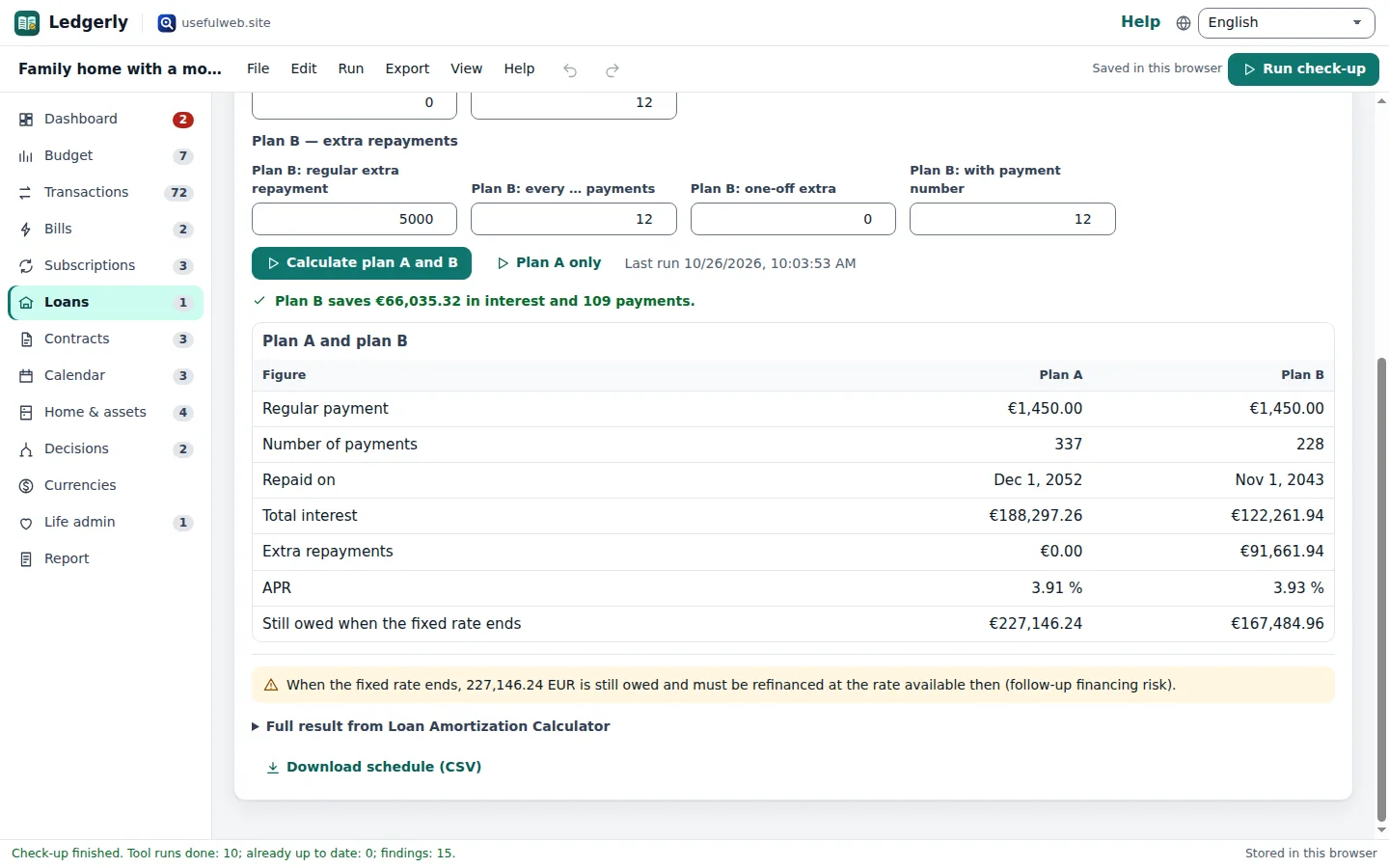
The block Plan B — extra repayments describes what you could do on top: a regular extra repayment every N payments and/or a one-off extra. In the example plan B pays an extra €5,000 every 12 payments.
Click Calculate plan A and B. Loan Amortization Calculator runs twice and Ledgerly compares the results:
| Figure | Plan A | Plan B |
|---|---|---|
| Number of payments | 337 | 228 |
| Total interest | €188,297.26 | €122,261.94 |
| Still owed when the fixed rate ends | €227,146.24 | €167,484.96 |
So plan B saves €66,035.32 in interest and 109 payments. The end of the fixed-rate period appears in the Calendar, and Download schedule (CSV) exports every payment.
2. Appliances and the replacement reserve
Open Home & assets. Each item has a Kind (refrigerator, heat pump, roof, water heater …), its Age (years), how hard it is used (Use), how well it is cared for (Care), the Replacement price and an optional Warranty until date.
Click Estimate remaining life of all items. How Long Will It Last? uses published life-expectancy ranges adjusted for use and care. Ledgerly turns the years left into a timeline and a Monthly reserve: the replacement price spread over the expected remaining life. Items with less than a year left are listed as Due now instead of being squeezed into a single month. The reserve becomes part of the Dashboard's cash flow.
Each row also has Repair or replace? and Extended warranty? — they open a pre-filled decision.
3. The decision toolbox
Open Decisions. Choose a calculator under New decision: repair or replace, true cost of owning, extended warranty, buy/rent/repair/subscribe, bulk buy check, price per unit, investment break-even, decision under uncertainty, job offers compared, split a bill, percentages, inflation, currency tools and the hidden fee finder. Fill in the form and click Calculate. Decisions are saved with the household.
4. Compare variant A and B
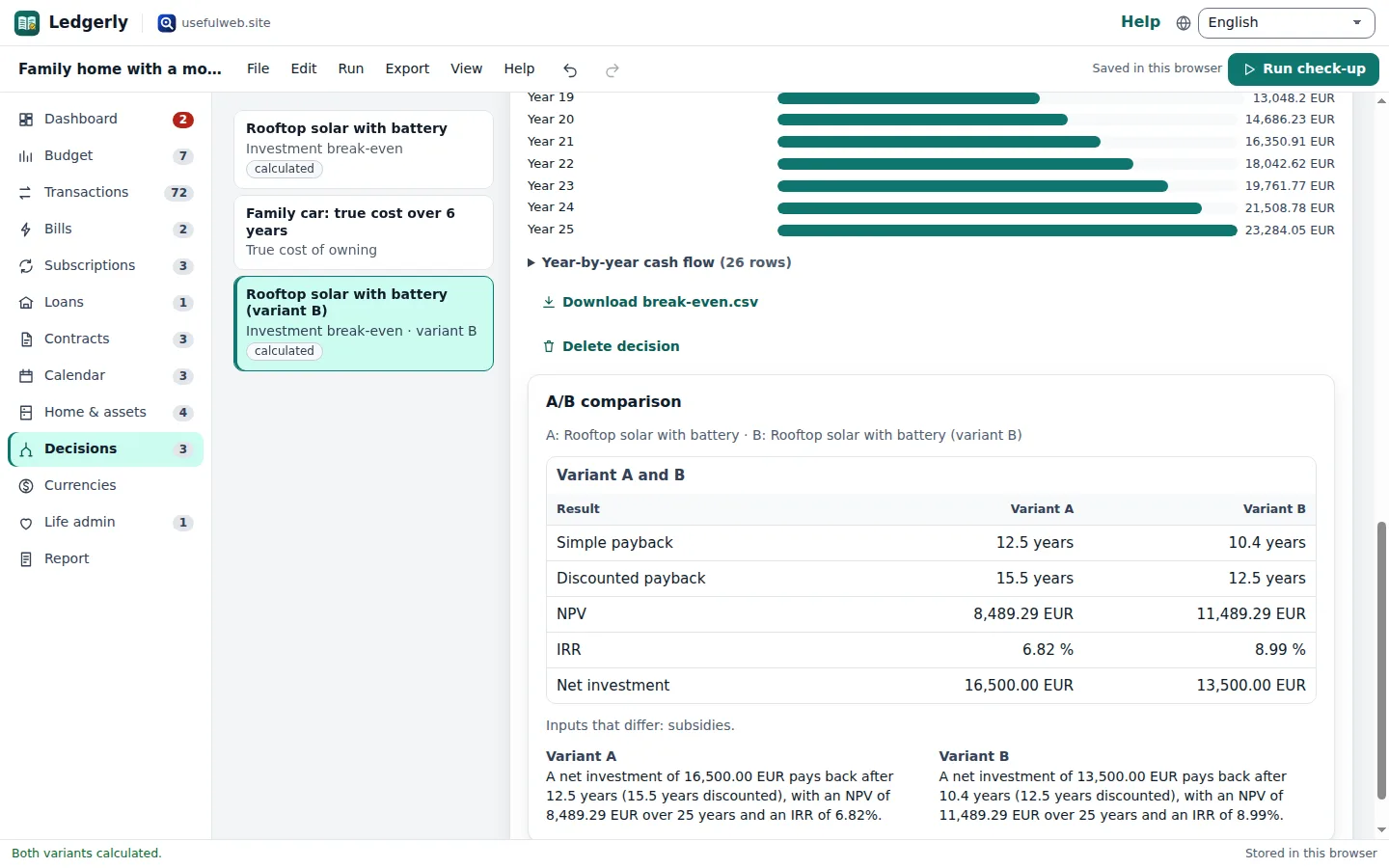
Click Duplicate as variant B, change one or two inputs — for example the subsidy for the rooftop solar decision — and click Calculate A and B in the A/B comparison card. Ledgerly lines up every key figure of both runs and lists the inputs that differ.
Ready to try it?